
Written by the Token Tails team. Facts checked against live data on ; sources are listed at the end.
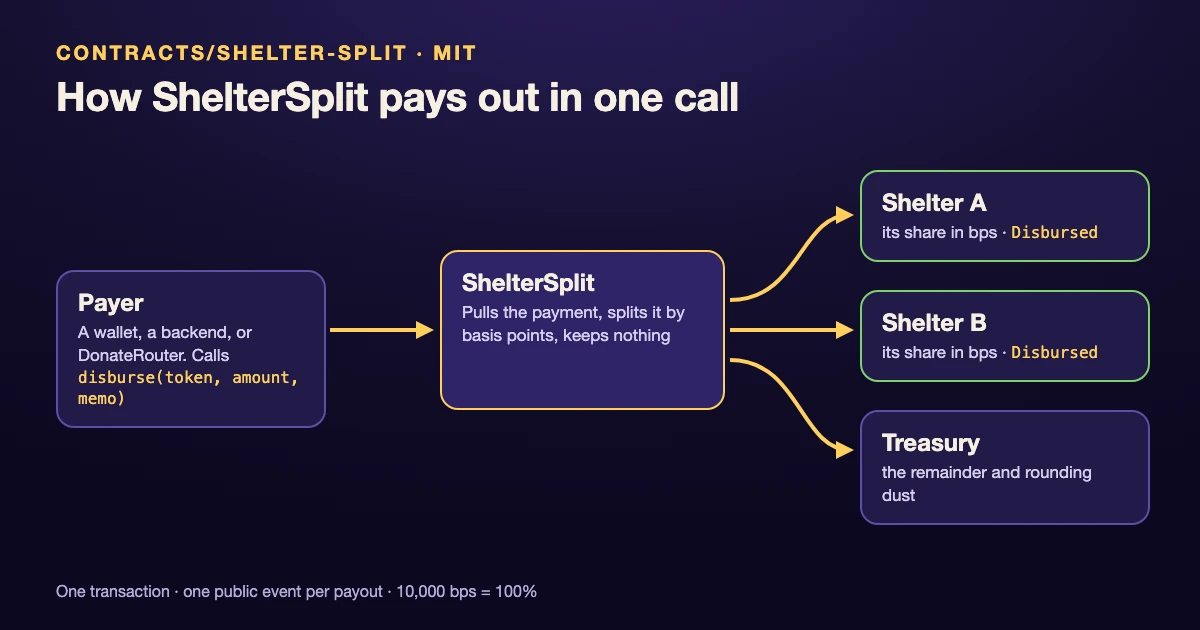
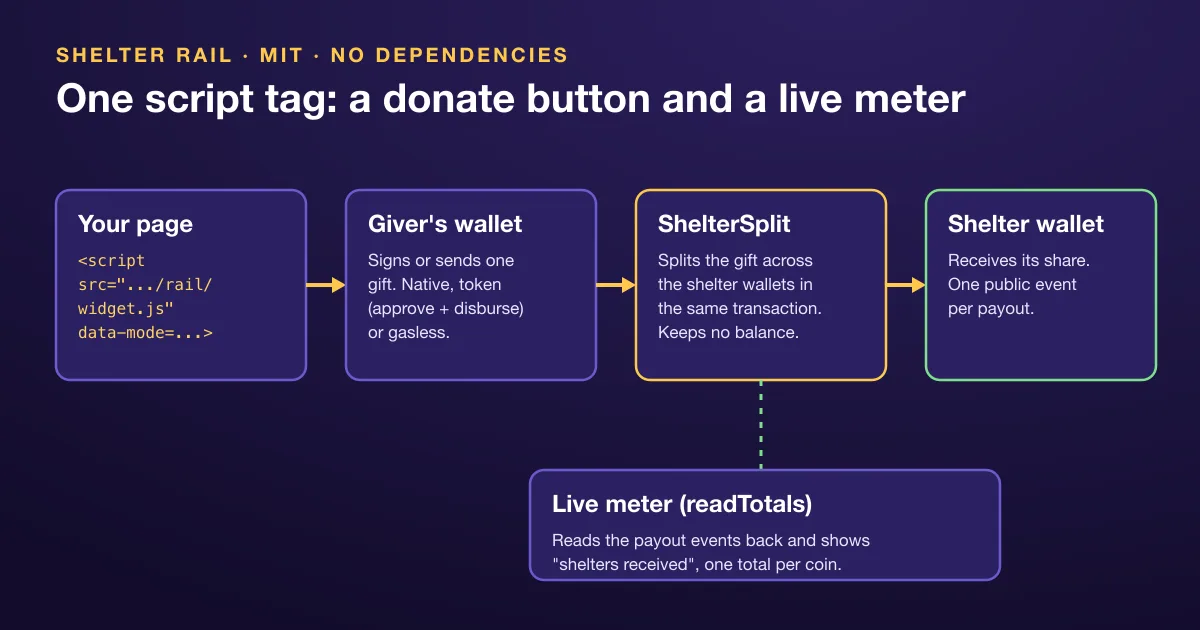
You can add a crypto donation button to any website with one <script> tag: the Shelter Rail widget draws a “Give 1 USDC” button and a live “shelters received” meter, and it works in a plain HTML page, a blog or a browser game. The gift goes from the giver’s wallet through the ShelterSplit contract to the shelter wallets in the same transaction, so neither your site nor the widget ever holds it.
The widget is MIT licensed, has no dependencies and needs no framework. This guide shows the exact tag, the three payment modes, the SDK behind it, and how to point it at your own charity.
Key takeaways
- One tag:
<script src="https://tokentails.com/rail/widget.js" data-…>. Styles live in a shadow root, so it will not clash with your CSS. - Three modes: native (Arc only), token (approve, then disburse) and gasless (EIP-3009 through DonateRouter plus a relay).
- Native and token modes need no backend. Gasless mode needs a relay URL, and the relay never holds the gift.
- The meter reads the payout events back from the chain and keeps every coin separate.
- The showcase shelter’s wallet was created by Token Tails, so any page that shows it must carry the disclosure below.
The one-tag install
The smallest working button reads its contract address from a published deployment list:
<script src="https://tokentails.com/rail/widget.js"
  data-chain="5042"
  data-deployments="https://tokentails.com/shelter-payouts/deployments.json"
  data-amount="1000000000000000000"
  data-memo="mygame"
  data-disclosure="Pink Paw (Rožinė pėdutė): payouts go to Pink Paw's wallet, which Token Tails created and keeps a recovery backup of."></script>
That is Arc mainnet (chain 5042), where USDC is the native coin with 18 decimals, so 1000000000000000000 is 1 USDC. The button mounts right after the script tag, or inside the element you name with data-target.
The attributes you will use most, copied from the Shelter Rail README:
| Attribute | Default | What it does |
|---|---|---|
data-chain |
5042 |
Chain ID: any of the seven mainnets or their testnets. |
data-mode |
auto |
native (Arc only), token, gasless, or auto: gasless when router, USDC and relay are set, else native on Arc, else token. |
data-split |
none | A ShelterSplit address. Use this or data-deployments. |
data-deployments |
none | URL of a deployments.json; the entry for data-chain is used. |
data-amount |
1 USDC | Native mode: wei (18 decimals on Arc). Token and gasless modes: base units, 6 decimals. |
data-memo |
widget |
A public memo, up to 64 characters. |
data-label |
“Give 1 USDC to shelters” | The button text. |
data-disclosure |
none | Small print under the button. Required when the shelter wallet is custodial. |
data-index |
none | Optional Token Tails API URL, so the meter starts from the payout index instead of scanning from block zero. |
data-theme |
visitor’s | light or dark. |
Memos are public and permanent. Use something like a game name or level, never an email or a player’s name.
Three modes: native, token and gasless
Native works only on Arc, the one chain in the set whose native coin is USDC. The wallet sends one transaction that calls donate(memo) on the split with the gift as its value.
Token works on every chain. The wallet asks twice: an approval for exactly the gift (skipped when the allowance already covers it), then disburse(amount, memo). On Tempo the widget calls disburseWithMemo instead. Before either step it reads split.token() and refuses a split that pays a different coin from the one on the button.
Gasless lets the giver sign one USDC authorization and pay no gas:
<script src="https://tokentails.com/rail/widget.js"
  data-mode="gasless" data-chain="5042" data-split="0xShelterSplit"
  data-router="0xDonateRouter" data-usdc="0xUSDC" data-relay="https://<relay>/shelter/relay"
  data-shelter="Pink Paw" data-amount="1000000"></script>
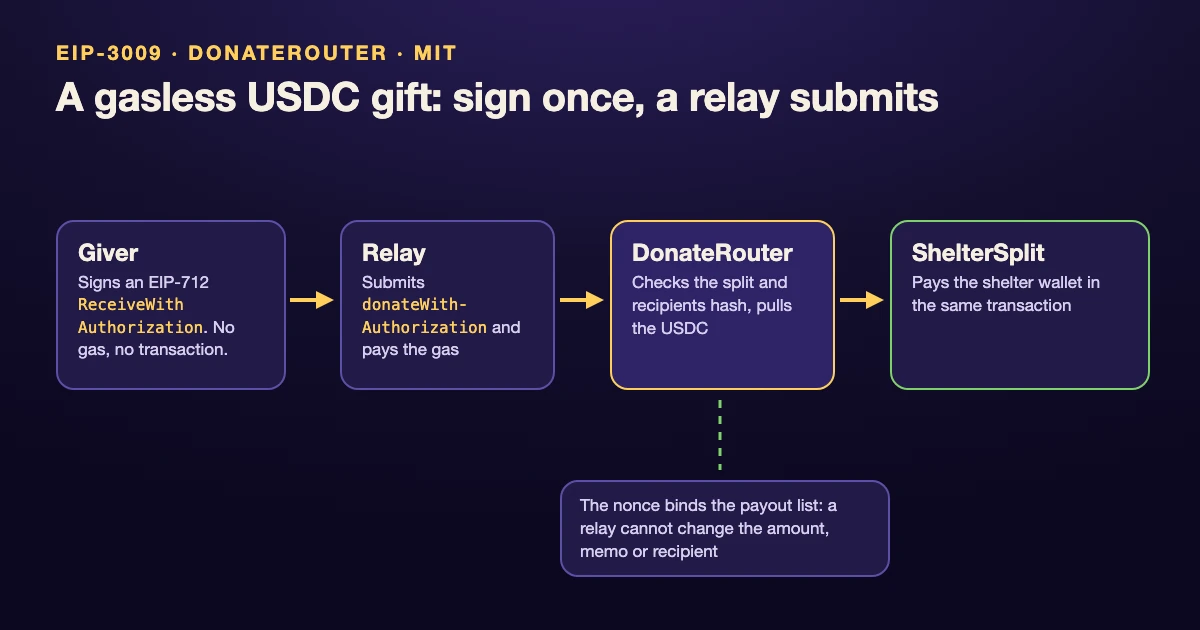
The giver signs an EIP-3009 ReceiveWithAuthorization; your relay submits it to DonateRouter, which has no owner and no balance, pulls the USDC and pays it through ShelterSplit in the same call. The signature binds the amount, the memo and the exact payout list, so the relay can only submit it or not. Before anything is signed, the widget asks the router canDonate(amount); if the split is paused or part of the gift would miss the shelters, nothing is signed. How the signature and the nonce work is covered in our EIP-3009 gasless donations guide.
Two honest limits. Gasless mode needs a coin with EIP-3009, so it does not run on Tempo or Robinhood Chain. And you need a relay: Token Tails’ public gasless relay is switched off today (GET https://api.tokentails.com/shelter/match/status reports "relay": false), so until data-router, data-usdc and data-relay are all set, the button reads “Gasless giving opens soon” and only the meter shows.
The live meter
Next to the button, the widget shows how much the shelters have received. It does not trust a database: it reads the split’s NativeDisbursed and Disbursed events from the chain, in log windows the public RPC accepts.
With data-index="https://api.tokentails.com", it first takes each contract’s totals from the Token Tails payout index, then reads only the newer blocks from the chain. If the index has not been updated for 15 minutes, or cannot be reached, it falls back to the chain alone. If the chain cannot be read either, the index’s last-known total stays on screen, marked “updating” with its time.
USDC, USDC.e, USDG and EURC are different coins, and the meter never adds them together. Why that matters, and how the scan works, is in our notes on eth_getLogs block range limits.
Using the SDK instead
If you want your own button, use src/sdk.mjs directly. It runs in browsers and Node 18 or later, with no dependencies:
import { readTotals, donateWithInjected, formatUnits } from "./src/sdk.mjs";

const totals = await readTotals("https://tokentails.com/shelter-payouts/deployments.json");
console.log(formatUnits(totals.nativeWei, 18), "USDC reached shelters");

const { txHash, explorerUrl } = await donateWithInjected(window.ethereum, {
  chainId: 5042,
  split: "0x...", // from deployments.json
  amountWei: 10n ** 18n,
  memo: "mygame:level-3",
});
The main exports:
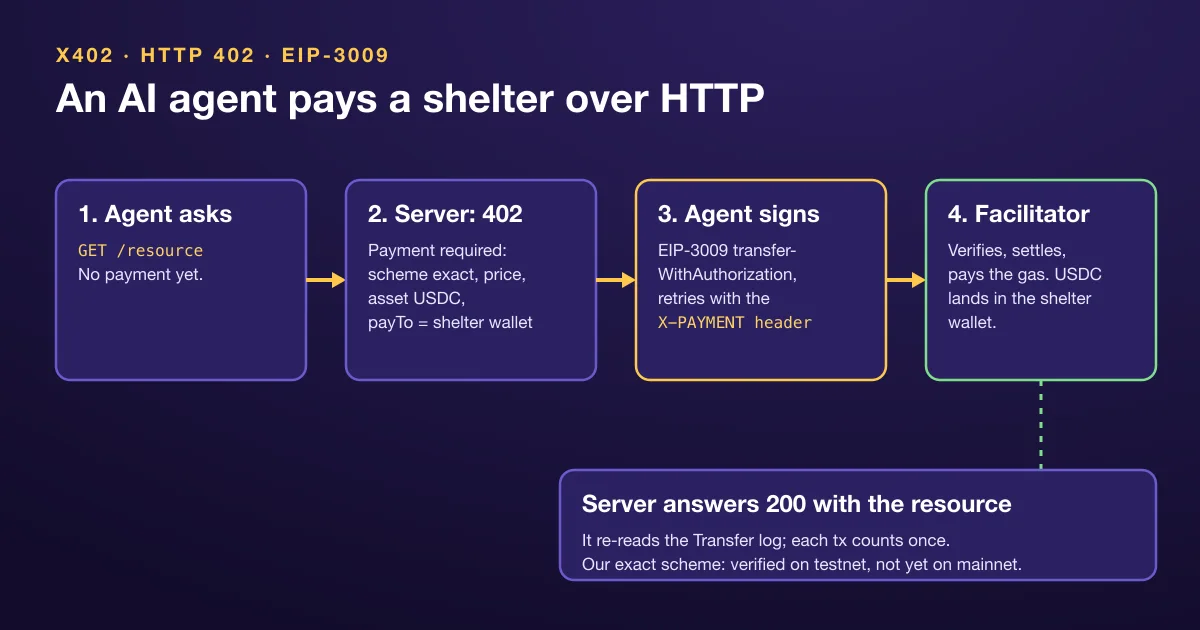
CHAINS: the public RPC, explorer, gas coin and payout coins for all fourteen networks. A test keeps it equal to the widget’s table.encodeDonate(memo): the calldata forShelterSplit.donate(string), if your app already has its own wallet code.donateWithInjectedanddonateTokenWithInjected: native and approve-plus-disburse gifts through an injected wallet.signAndRelay: the gasless flow. It checks that the router points at your split and USDC, reads the EIP-712 domain from the chain, asks for one signature and posts it to your relay.readTotals: the meter’s numbers, per deployment and per coin.payAndFetch: an x402 client, for when an AI agent rather than a person is paying. See x402 donations.
Try it on testnets first
tokentails.com/rail/demo.html runs the widget against the seven testnet splits, with a chain picker. A “Test USDC, no real money” chip marks every testnet button. Get test USDC from a faucet, give, and watch the meter move. The demo has no public relay, so its gasless button stays in the “opens soon” state; run your own relay to test that path.
When you switch to mainnet, read the addresses from deployments.json and routers.json rather than pasting them by hand.
Custody statement and disclosure
From the README, word for word: “Every path moves money donor → ShelterSplit → shelter wallet, or donor → shelter wallet. No path holds funds in a contract or relay in between.”
The showcase shelter on the rail is Pink Paw (Rožinė pėdutė), a cat shelter in Kaunas, Lithuania. Its disclosure, also verbatim: “payouts go to Pink Paw’s wallet, which Token Tails created. Since 2026-10-16 every mainnet split pays it. Before then they went to a wallet Token Tails held for the shelter, and the testnet splits still pay that wallet. The contract itself is non-custodial. Any page that shows this shelter must show this disclosure.”
Shelter staff hold that wallet’s recovery phrase, and Token Tails keeps a recovery backup. If you embed the button for Pink Paw, put that disclosure in data-disclosure or next to the widget.
Pointing it at your own shelter
The widget is not tied to one charity. To pay a different organisation:
- Deploy your own ShelterSplit with that organisation’s wallet (or several wallets with basis-point shares). The design and the Foundry deploy are in our USDC payment splitter contract walkthrough.
- Confirm the wallet really belongs to the charity, ideally with a signed message from that address. A button is only as honest as the wallet behind it.
- Set
data-splitto your contract, or publish your own deployments.json and usedata-deployments. - For gasless gifts, deploy a DonateRouter in front of your split and run a relay.
- Write your own
data-disclosurethat says who holds the receiving wallet.
Arc is a good first chain, because USDC is the gas coin there and native mode needs a single transaction; the decimals catch is explained in USDC payouts on Arc.
Check it yourself
Every mainnet gift the widget sends to Pink Paw shows up on /shelter-payouts with its transaction, coin and memo, once the payout index has read that block (each chain’s progress is in the payout API). Gifts from Motored, the Token Tails founder’s own company, are labelled as sponsor money. If your memo shows up there, the button worked.
Frequently asked questions
Does the relay in gasless mode hold the money?
No. The relay only submits the giver's signed authorization and pays the gas. DonateRouter pulls the USDC and pays it through ShelterSplit in the same transaction, and the signature fixes the amount, the memo and the payout list, so the relay cannot change them.
Which chains does the widget support?
Seven, each with a mainnet and a testnet: Arc, Tempo, Arbitrum, Avalanche C-Chain, Base, Robinhood Chain and Monad. Gasless mode needs a coin with EIP-3009, so it is not available on Tempo or Robinhood Chain.
Do I need a backend to add the button?
Not for native or token mode. The widget talks to the visitor's wallet and the chain's public RPC directly. Only gasless mode needs a relay URL, because someone has to submit the signed gift and pay its gas.
Can I use it for a charity other than Pink Paw?
Yes. Deploy your own ShelterSplit with the wallets you want to pay, then point data-split (or data-deployments) at it. The contracts and the widget are MIT licensed.
Check it yourself
Facts checked against live data on . Live figures change: the links below always show the current ones.