
Written by the Token Tails team. Facts checked against live data on ; sources are listed at the end.
To verify a crypto donation, open its transaction on the network’s block explorer and check three things: the money left the sender, it arrived at the charity’s address, and that address really belongs to the charity. The explorer proves the first two in seconds; the third takes a little detective work.
This guide walks through each step, then checks one real payout to a cat shelter from start to finish.
Key takeaways
- On-chain proof shows a transfer to an address. It does not show what the charity spends the money on.
- The key question is who holds the receiving wallet: the charity itself, or someone holding it for them.
- A transaction page shows the sender, the receiver, the amount, the time and any contract events, including a memo.
- Compare what you find with the charity’s own payout page. Every number should match.
What on-chain proof can and cannot tell you
A blockchain is a public record. Anyone can see that address A sent 10 USDC to address B at a given time, and nobody can quietly edit that afterwards. That is a stronger record than a “thank you” email.
It has limits, though:
- It proves a transfer, not an outcome. The record ends at the receiving address. Whether the money then paid for vet care, food or rent is something the charity has to report.
- An address is not a name. Anyone can create an address. Until you know who holds its keys, you only know the money reached an address.
- Custody matters. A wallet the charity holds itself (its staff keep the keys) is different from a wallet a platform holds on the charity’s behalf. Both can be honest, but they ask for different levels of trust.
On Token Tails’ impact page, money is labelled with evidence chips for this reason: ON-CHAIN · SHELTER WALLET means the shelter holds the wallet; ON-CHAIN · CUSTODIAL means a wallet Token Tails held for the shelter before the 16 October 2026 handover; COMPANY-REPORTED means a figure the company states that you cannot check on-chain.
Step 1: Find the receiving address and who controls it
Start with the charity’s own page. A charity that takes crypto should publish its receiving address or the contract that pays it, and say who controls it.
Look for:
- the address on the charity’s own website or social accounts, not only on a platform’s page;
- a statement of custody: does the charity hold the keys, or does a platform hold them?
- the history: was the wallet handed over, and when?
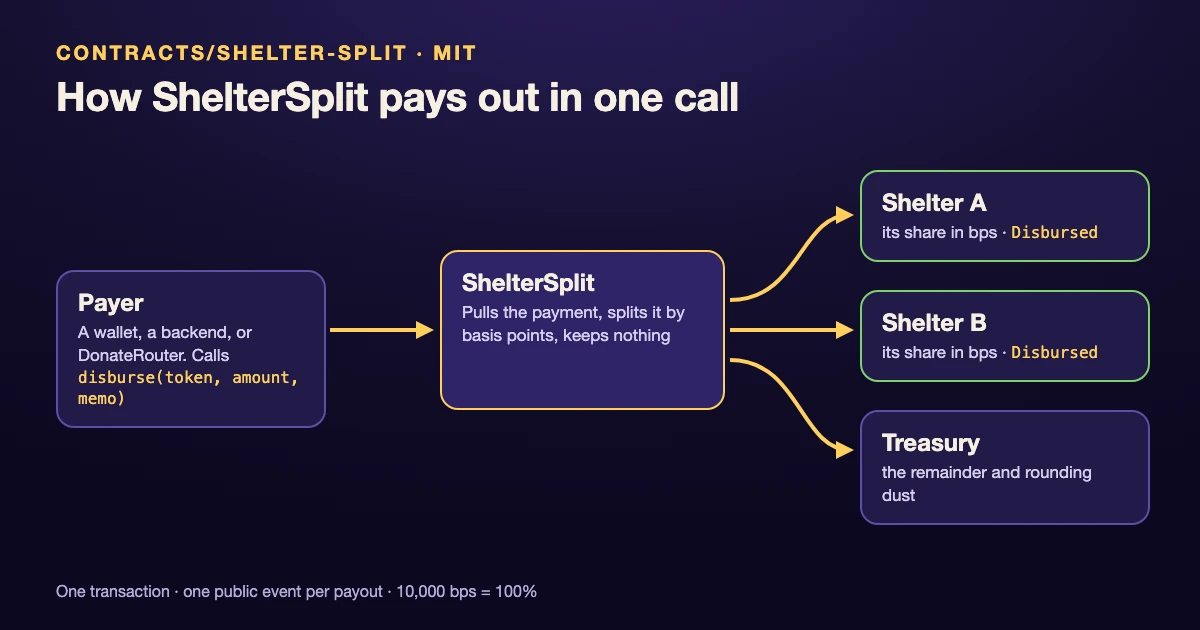
If a contract pays the charity, the contract can tell you where the money goes. A splitter contract, for example, stores its list of recipient wallets and their shares, and anyone can read it on the explorer.
Step 2: Open the transaction on a block explorer
Every transaction has a hash, a long string starting with 0x. Paste it into the explorer for that network:
| Network | Explorer |
|---|---|
| Arc | explorer.arc.io |
| Base | basescan.org |
| Arbitrum | arbiscan.io |
On the transaction page, check:
- Status: success, not failed or pending.
- From: the sender’s address.
- To: the address or contract it went to.
- Time and block: when it was confirmed.
- Value or coin transfers: how much moved, and in which coin.
If you only have the charity’s address, search for it instead and you will see every payment it has received.
Step 3: Read the event and the memo
When a donation goes through a contract rather than straight to a wallet, the detail is in the events (the “Logs” tab on most explorers). Events are public records the contract writes as it runs.
The ShelterSplit contract that Token Tails uses, for example, pays every active shelter in the same transaction and writes one public event per payout:
Disbursed(for coins like USDC on most networks) orNativeDisbursed(for Arc’s native USDC), with the shelter address, the amount and a memo;- one batch event with the totals: how much went to shelters and how much to the treasury.
The memo is a short text attached to the payment. It lets you match a payout to its source, such as a campaign or an order number, without putting anyone’s personal data on-chain.
Step 4: Compare with the charity’s own page
The last check is consistency. The charity’s (or platform’s) public page should show the same transactions you found on-chain: same amounts, same addresses, same dates.
Token Tails publishes a shelter payouts page that lists every ShelterSplit payout to Pink Paw from public on-chain events, each amount linked to its transaction on the explorer. Pick any row, open the link, and check it against Steps 2 and 3.
Worked example: one real payout to Pink Paw
Here is one payout, checked end to end. It is a free treat that Token Tails sent to Pink Paw, a cat shelter in Kaunas, Lithuania, after someone tapped on the give page.
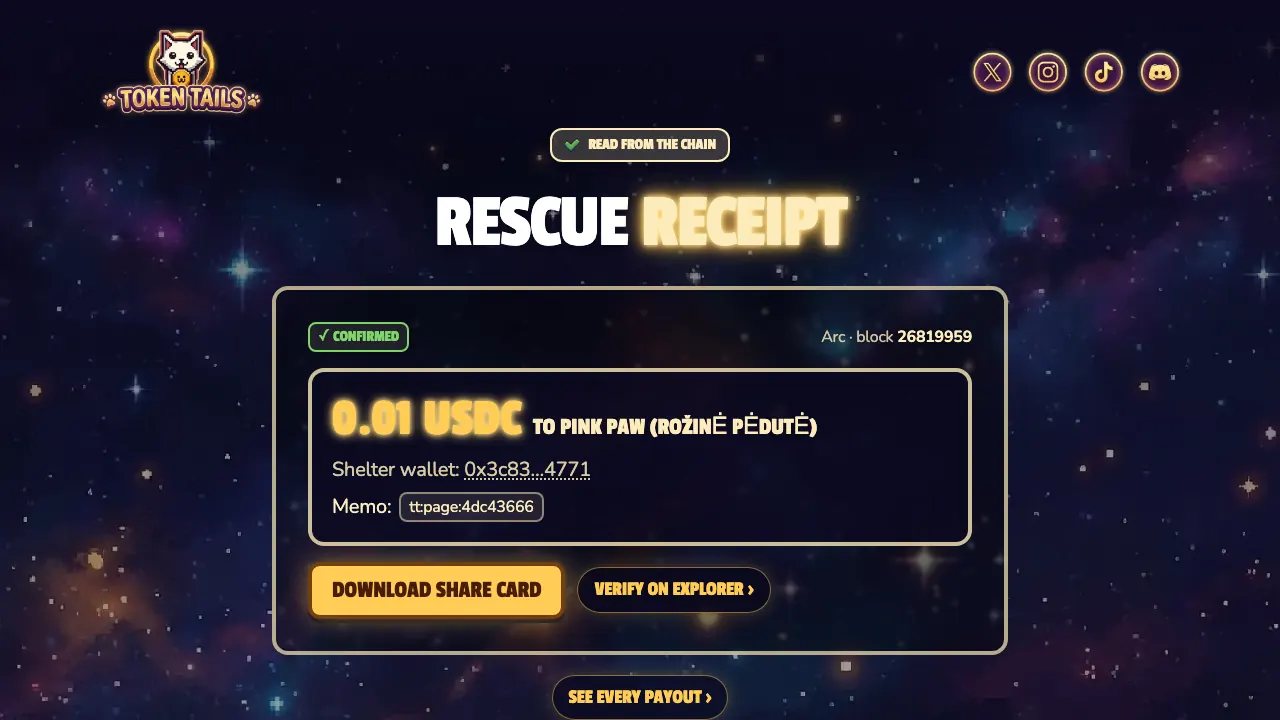
The transaction: 0xc1b6da1f…5e0a on the Arc explorer, Arc mainnet, block 26,819,959, 19 October 2026 at 19:07:06 UTC, status success.
- From:
0x8D03…2ba0, Token Tails’ treat wallet. Token Tails pays for the treat; it costs the person who tapped nothing. - To:
0x457c…B147, the ShelterSplit contract on Arc. - The payout event:
NativeDisbursedto shelter0x3c83…4771for 0.01 USDC, memott:page:4dc43666(a treat from the give page). - The batch event: batch 995, 0.01 USDC to shelters, 0 to the treasury, one shelter paid.
- Who holds the receiving wallet:
0x3c833562e682dB66C2415b34961595df135f4771is Pink Paw’s own wallet. Pink Paw’s staff hold its recovery phrase, and Token Tails keeps a recovery backup. Since 16 October 2026, Token Tails’ mainnet ShelterSplit contracts send Pink Paw’s payouts to it. - Cross-check: the same payout appears on the shelter payouts page.
Every step is checkable by anyone, without an account.
Live from the payout ledger
Red flags
- No address, or only a QR code with no way to tie it to the charity.
- An address that appears only on a third party’s page, never on the charity’s own channels.
- Totals you cannot reproduce. If a platform claims a figure, you should be able to sum it from the transactions it links. Watch for different coins added into one number. Token Tails’ own “$40K+ donated directly in crypto and goods (Oct 2026, company-reported)” is such a figure, which is why /impact labels it COMPANY-REPORTED and keeps it out of the on-chain totals.
- No custody statement. If nobody says who holds the wallet, assume a platform does.
- Contract owners with unchecked power. Many splitter contracts have an owner who can change the recipient list. That is normal, but the changes should be public events. ShelterSplit, for example, emits
ShelterAdded,ShelterUpdated,ShelterActiveSet,ShelterRemovedandTreasuryChangedwhenever its owner changes the list or the treasury. - Sponsor money presented as public support. Payments from a company related to the platform are fine, but they should be labelled as such, not counted as donors.
Checking a payout is the last step; before you give to any rescue, run the checks for a legitimate animal rescue. For more on how the Token Tails payouts are built, read how Token Tails works and the USDC payment splitter contract.
Frequently asked questions
Can I see where a crypto donation went?
Yes, up to the receiving address. Paste the transaction hash into the network's block explorer to see the sender, the receiving address, the amount and any events the contract emitted.
Does an on-chain transaction prove the charity spent the money well?
No. It proves a transfer to an address. Who controls that address, and what the charity buys with the money, need other evidence: the charity's own statements, reports and receipts.
What is a memo in a crypto donation?
Some contracts let the sender attach a short text, the memo, to each payment. It is stored in the transaction's event and helps match a payment to an order or campaign.
How do I know a wallet belongs to the charity?
Look for the address on the charity's own channels, a signed message from that address, or a custody label from the platform. Be wary of addresses that only appear on a third party's page.
Check it yourself
Facts checked against live data on . Live figures change: the links below always show the current ones.